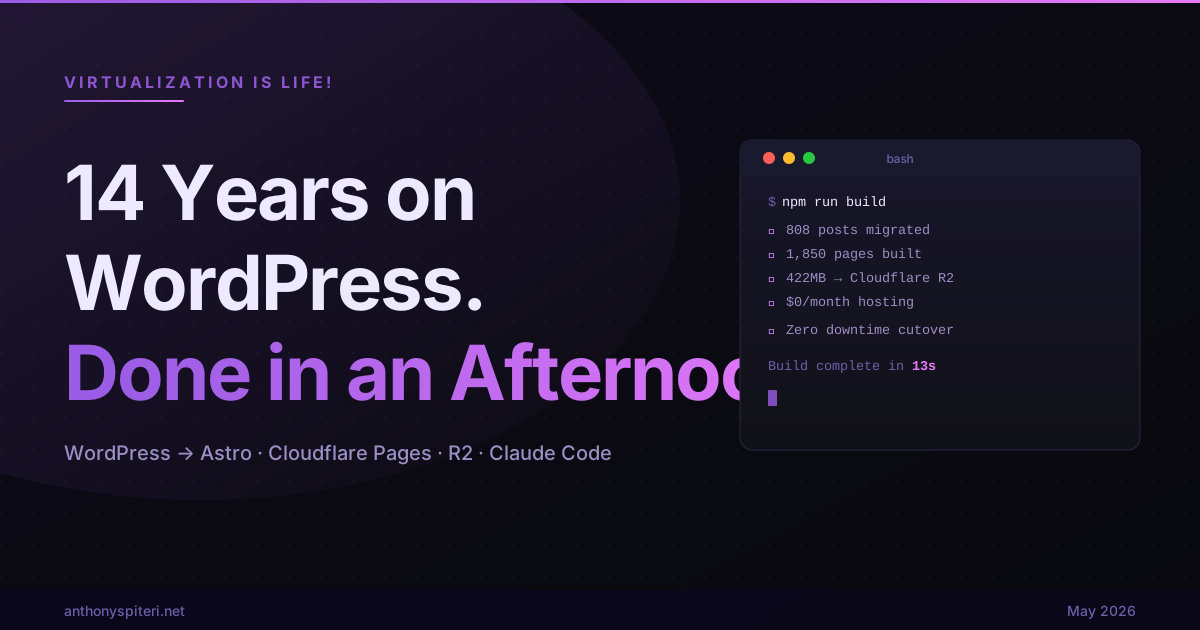
14 Years on WordPress. Done in an Afternoon.
As I sit here writing up this post I am doing so via a platform that’s not WordPress for the first time since 2012, when I first launched what was at the time, Hosting is Life!. That became Virtualization is Life! and since then this blog has been up and running, 800+ posts and a lot of content created from the art of doing. Tinkering and via the day job at my previous places of work, and here at Veeam.
The site was old, looked pretty shit and as you will see below, ran on a VM instance that I first deployed way back in 2013 and needed to be decommissioned. I had tried this before, a couple of times… even looked at converting this single VM to a Kubernetes three node setup at one stage! What a disaster that would have been.
Ultimately as I slow down my blogging it became clear that the site needed to move to a static site, and get away from the bloat that had become WordPress. Lots of options, no time to focus on that task, but I eventually gave it a red hot go with the help of Claude Code and all the modern AI automation that comes with that… the result is below.
The Server
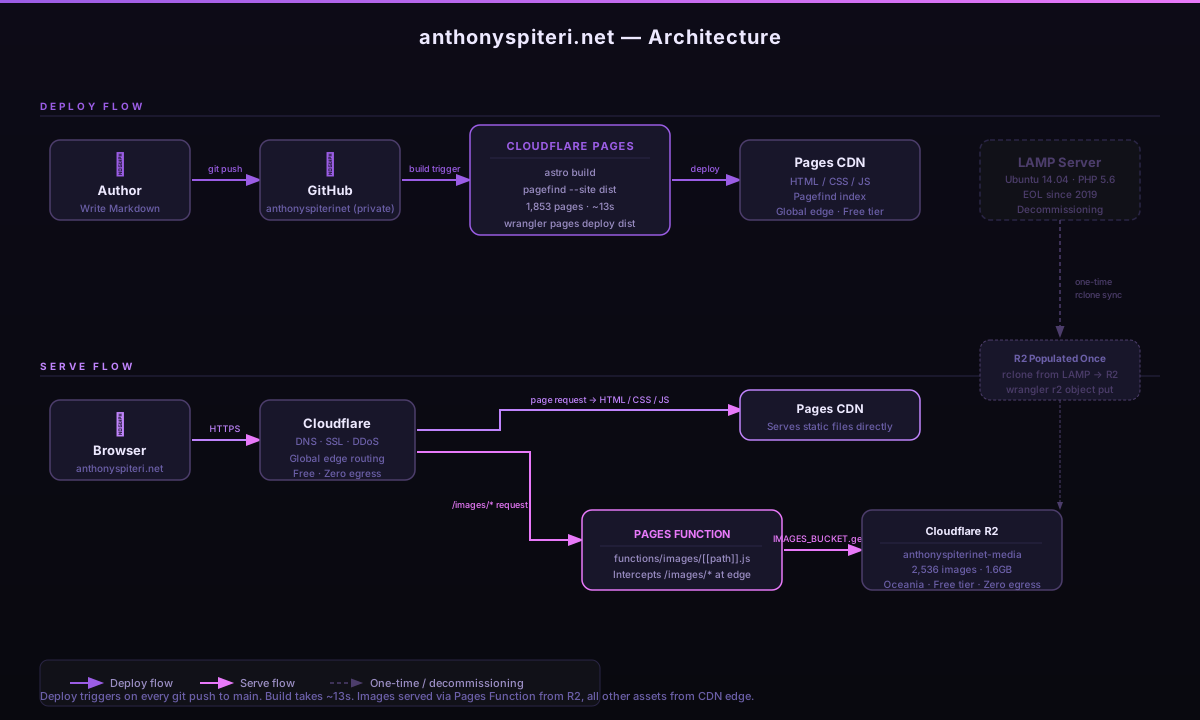
I first stood up the LAMP stack running this blog back in 2013. Ubuntu 14.04, PHP 5.6. By the time we got around to moving it, Ubuntu 14.04 had reached end of life in April 2019. PHP 5.6 followed in December 2018. So yeah, a publicly accessible website sitting on unpatched infrastructure for years. Not a great look, and honestly reason enough on its own to move.
What Needed to Happen
The target was Astro on Cloudflare Pages. Astro because it’s built for exactly this kind of content site and the Markdown support is excellent. Cloudflare because I’m already running DNS through them, there are zero egress fees on their CDN, and the whole thing runs on the free tier at the traffic levels this blog sees.
A few things were non negotiable going in. Every single URL had to stay exactly the same, no dates in paths, no category prefixes. Fourteen years of inbound links and SEO ranking are not something you throw away. Images needed a proper home because 422MB of originals can’t live in a git repo. RSS had to keep working. And 712 comments in the database needed figuring out.
What Claude Code Actually Did
I described what I wanted and Claude Code figured out how to get there, wrote the scripts, ran them, debugged when things broke, and kept moving. The quick version: the WP-CLI export quirks, a script to convert the WXR export to Markdown, the Cloudflare R2 bucket setup, wiring up a Pages Function to proxy image requests… stuff that I estimated would take me weeks of work happened across a few hours of back and forth.
That’s not me saying I sat back and watched. Decisions needed making throughout. Some of the debugging required actual understanding of what was failing before a fix was even possible. But the execution of those decisions was handled almost entirely by the tooling, which is the part that changes the equation.
A few specific examples of where this made a real difference…
The WP-CLI export. The WordPress admin export UI chokes badly on a site this size. WP-CLI is the right tool but there’s a gotcha where it creates two files when you filter by post type, and if you don’t use {n} in the filename format, the second file silently overwrites the first. You end up with 316 media attachments exported and exactly zero actual posts. I would have spent an hour working out why my export was empty.
The HTML to Markdown conversion. 808 posts worth of WordPress HTML with TinyMCE editor artifacts baked in, smart quotes encoded in Windows-1252 that became  characters scattered through the content, and the occasional [gallery] shortcode thrown in for good measure. A Python script that handled all of that cleanly would have taken me most of a day to write, test, and debug. We got to something producing clean output in about ten minutes.
The R2 image setup. Cloudflare R2 uses the S3 API with zero egress fees, which makes it the obvious choice here. Getting 2,536 image files transferred from the LAMP server into R2 and then wiring up a Cloudflare Pages Function to proxy all /images/* requests through the bucket is not technically complicated… but it’s also not something you just know off the top of your head. The rclone configuration, the Pages Function code, the bucket binding in the Cloudflare dashboard were all done without me having to look a single thing up.
Where I Still Had to Drive
It wasn’t all plain sailing. The Cloudflare Workers/Pages merger is genuinely confusing right now and their auto config kept injecting an SSR adapter that switched Astro from static output to server rendered mode. That resulted in a couple of failed deployments before the actual problem was understood and the fix became obvious. That kind of thing still requires a human who knows what they’re looking at.
The comments question was also mine to answer. 712 approved comments across 299 posts… I decided to archive them as static HTML rather than drag in an external commenting platform and add another dependency to a site I’m trying to simplify. Not the most exciting outcome for people who left those comments over the years, but the right call.
The tone of this blog. The design direction. The navigation. Those are still mine.
The Numbers
After one afternoon, the state of play:
- 808 posts migrated with all URLs preserved exactly
- 1,787 URLs in the sitemap, the new site adds category and tag archive pages that didn’t exist before, which is a genuine SEO improvement
- 422MB of original images now in Cloudflare R2, served via CDN
- 712 comments archived as static HTML
- 13 seconds to build 1,850 pages
- $0/month hosting cost on Cloudflare’s free tier
The LAMP server is still running but has no traffic going to it. I’ll shut it down properly once the new site has run for a few weeks and I’m satisfied nothing has been missed.
How It All Fits Together
For those interested in the actual architecture, here’s the full picture of how the deploy and serve flow works…
This Is What the Shift Actually Looks Like
For me this is less about the blog and more about what AI assisted execution now makes possible at a broader level. Tasks that previously sat in the too hard, too time consuming, too risky to get wrong basket are increasingly within reach for a single person in an afternoon. The gap between having a good idea and being able to execute on it has closed at a rate of knots over the past couple of years… and I think we’re only just starting to understand what that means for how practitioners actually work.
The bottleneck is no longer execution. The bottleneck is judgement, taste, and knowing what you actually want to build. That’s a pretty significant shift and it applies well beyond blog migrations.
Hold on people! We are really only at the beginning of this!
#Astro #Cloudflare #WordPress #AI #ClaudeCode