
ESXi 5.5 Update 2: vMotion Fails at 14% with Stale Admission Control and VM Reservations
We are currently in the process of upgrading all of our vCenter Clusters from ESXi 5.1 to 5.5 Update 2 and have come across a bug whereby the vMotion of VMs from the 5.1 hosts to the 5.5 hosts fails at 14% with the following error:
[UPDATE 6/10] -
Observed Conditions:
- vCenter 5.5 U1/2 (U2 resulted in less 14% stalls, but still occurring)
- Mixed Cluster of ESXi 5.1 and 5.5 Hosts (U1 or U2)
- Has been observed happening in fully upgraded 5.5 U2 Cluster
- VMs have various vCPU and vRAM configuration
- VMs have vRAM Reservations Unlimited vRAM/vCPU
- VMs are vCD Managed
Observed Workarounds:
- Restart Management Agents on vMotion Destination Host (hit + miss)
- vMotion VM to 5.1 Host if available
- Remove vRAM Reservation and Change to Unlimited vCPU/vRAM
- Stop and start VM on different host (not ideal)
We are running vCenter 5.5 Update 1 with an number of Clusters that where on ESXi 5.1 of which some act as Provider vDCs for vCloud Director. Upgrading the Clusters which are not vCloud Providers (meaning VMs aren’t vCD managed or have vCD reservations applied) didn’t result in the issue and we where able to upgrade all hosts to ESXi 5.5 Update two without issue. There seemed to be no specific setting or configuration of the VMs that ultimatly got stuck during a vMotion from a 5.1 to 5.5 host however they all have memory reservations of various sizes based on our vCloud Allocation Pool settings. Looking through the host.d logs on the 5.5 Host acting as the destination for the vMotion we see the following entry:
2014-10-01T07:09:12.783Z [7CF81B70 info 'Solo.Vmomi' opID=EE34B3DD-0001CB0E-11-96-32 user=vpxuser] Result:
--> (vim.fault.Timedout) {
--> dynamicType = <unset>,
--> faultCause = (vmodl.MethodFault) null,
--> faultMessage = (vmodl.LocalizableMessage) [
--> (vmodl.LocalizableMessage) {
--> dynamicType = <unset>,
--> key = "vob.sched.group.mem.admitfailed",
--> arg = (vmodl.KeyAnyValue) [
--> (vmodl.KeyAnyValue) {
--> dynamicType = <unset>,
--> key = "1",
--> value = "vm.334204",
--> },
...
...
--> ],
--> message = "Group vm.334204: Cannot admit VM: Memory admission check failed. Requested reservation: 312526 pages
--> ",
--> },
...
...
--> ],
--> message = "Group vm.334204: Invalid memory allocation parameters for virtual machine vmm0:TWC_Web_2_(a7109c43-8041-4b74-91f8-af94a809203d). (min: 298752, max: 4294967295, minLimit: 4294967295, shares: 4294967293, units: pages)
--> ",
--> },
--> (vmodl.LocalizableMessage) {
--> dynamicType = <unset>,
--> key = "msg.vmmonVMK.admitFailed",
--> arg = (vmodl.KeyAnyValue) [
--> (vmodl.KeyAnyValue) {
--> dynamicType = <unset>,
--> key = "1",
--> value = "msg.vmk.status.VMK_MEM_ADMIT_FAILED",
--> },
--> (vmodl.KeyAnyValue) {
--> dynamicType = <unset>,
--> key = "2",
--> value = "VMware ESX",
--> }
--> ],
--> message = "Could not power on VM : Admission check failed for memory resource
--> See the VMware ESX Resource Management Guide for information on resource management settings.
--> ",
--> },
--> (vmodl.LocalizableMessage) {
--> dynamicType = <unset>,
--> key = "msg.monitorLoop.createVMFailed.vmk",
--> message = "Failed to power on VM.",
--> },
--> (vmodl.LocalizableMessage) {
--> dynamicType = <unset>,
--> key = "msg.migrate.resume.fail",
--> message = "The VM failed to resume on the destination during early power on.
--> ",
--> }
--> ],
--> msg = ""
--> }
Some of the key entries where
message = "Could not power on VM : Admission check failed for memory resource
--> See the VMware ESX Resource Management Guide for information on resource management settings.
and
The VM failed to resume on the destination during early power onAfter trying to scour the web for guidance we came across (http://kb.vmware.com/selfservice/microsites/search.do?language=en_US&cmd=displayKC&externalId=1018180) which listed the error specifically…but specifies VMs already powered off and not ones powered on and under vMotion…in any case the resolutions that are suggested not viable in our environment…namely the stopping and starting of VMs and rejigging of the Memory Reservation settings.
We engaged VMware Support and raised a Support Request…after a little time working with support it was discovered that this may be an internal bug which first appeared as fixed in ESXi 5.5 Extras Patch 4 but appears to have slipped past the Update 2 release. The bug relates to stale Admission Control Constraints and the workaround suggested was to restart the management agents of the destination 5.5 host…in addition to that if this was occurring in a vCloud Provider Cluster it was suggested that the Host be disabled from within vCloud Director and then trigger the Redeploy All VMs action as shown below
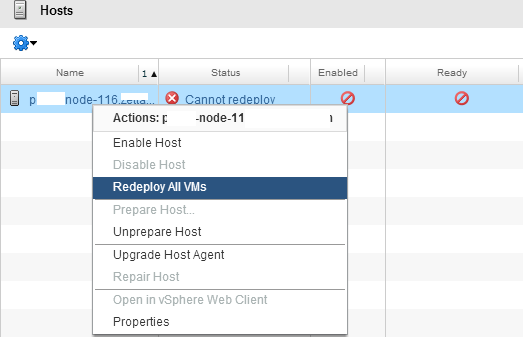
This effectively triggers a Maintenance Mode task in vCenter against the host, which for mine is no different to triggering a Maintenance Mode from vCenter directly…however the specific workaround in vCD environments was to use this method in conjunction with the destination Host management agent restart.
Results have been mixed up to this point and we have faced VMs that simply wont vMotion at all even after trying every combination stated above. Our own workaround has been to shuffle those VMs to other 5.1 hosts in the cluster and hope that they will vMotion to a 5.5 host as we roll through the rest of the upgrades. Interestingly enough we have also seen random behaviour where if, for example 6 VMs are stuck at 14%…after a agent restart only 4 of them might be affected and in subsequent restarts it might only be 2…this just tells me that the big is fairly hit and miss and needs some more explaining as to the specific circumstance and reasoning that trigger the condition.
We are going to continue to work with VMware Support to try and get a more scientific workaround until the bug fix is released and I will update this post with the outcomes of both of those action items when they become available…its more of a rather inconvenient bug… but still…VM uptime is maintained and that’s all important.
If anyone has had similar issues feel free to comment:
7 Commentsarchived